
SGGMP 2025: Image analysis workshop
Image analysis workshop
Welcome. This webpage explains the workshop and provides the data required to run the exercises in your PC.
Presenters:
- Dr. Marco A. Acevedo Zamora: second introduction and exercises
- Prof. Balz S. Kamber: first introduction
Introduction:
The petrographic polarising microscope is a foundational tool in geoscience research to answer first-order questions such as rock micro-structure, fabric, and mineral assemblage at multiple observation scales. The arrival of fast and reliable optical slide scanners for biomedical imaging has motivated their re-implementation as polarising microscopes for imaging rock thin sections. Investigators are now demanding sharing their slide data around the world via virtual microscopes, scaling up image analysis to hundreds of thin sections, and integrating optical imagery with other modalities, especially chemical maps.
The literature shows image analysis of rock thin sections studying small fields of view and targeting mineral grains with one microscopy technique is a challenging task. Large-scale and correlative (more than one technique) microscopy requires a step evolution of image analysis software and algorithms that can cope with image pyramids for registration, segmentation, classification, and image representation of pixels and objects that simplify observation of the underlying data. The average user will need centralised orchestration of data management, image processing, and image analysis for trialling and interacting with open-source code and data that might not be locally available (the cloud).
This workshop will introduce offline standalone software to process very large images: (1) Cube converter, (2) Chemistry simplifier, and (3) phase interpreter. They can be combined into image analysis pipelines for semi-automated mineralogy. The pipelines can be customised by the user and work on their PC to allow advanced navigation, pixel classification (QuPath software), object identification and dimensionality reduction applied to a variety of rock types (igneous, metamorphic, and sedimentary). Using an example of a websterite thin section, the workshop will also demonstrate how image analysis tools can help to transition from subjective user-driven classification to more objective interpretation of object classes and their mutual relationships.
Requirements:
Before attending the workshop, attendants will need to:
- Read the workshop booklet (25 pg.):
- Part 1: Windows users
- Part 2: Mac users
- Part 3: Extra material (Windows only)
- Benchmark: Those who completed Part 2
- Download the material in your personal computer (PC), preferrably into a SSD drive
- Install the image analysis software
- Ensure to have 50 GB of free disk space to follow the workshop (after downloads and installations)
- Bring the PC to the workshop with a charger and mouse device.
If you prefer to be given the files in person (copying takes ~5 minutes is using USB 3.0), it is recommended to bring an external SSD and contact us earlier during the seminar.
Workshop material
All the workshop material is digital and freely distributable and can be downloaded from a single file (link). The complete set of files to download is listed at the bottom of this page.
A more granular description and individual downloads are given below (if the large single download is too much for your internet conection): *Note: most links below are expired (use the one above).
-Files to run the workshop
- Workshop booklet: link
- Internal and external image analysis software executables and installers: link
- Part 1 dataset, Navigating in QuPath: link
- Part 2 dataset: Petrographic image analysis
Part 3 dataset: No download available. It can be done with Part 2B outputs.
- Additional material: link
- Video links on image analysis routines (e.g., image registration)
- Courses and resources to learn image analysis
- Video on VS200 slide scanner acquisition
- Overall workflow picture
For convenience, large downloads have been zipped and need to be unzipped. The download links will expire on 16th December, 2025
Image analysis software
The internal software executables (run in Windows 11):
- Cube converter: processing optical images (link)
- Chemistry simplifier: processing chemical images (link)
- Phase interpreter: producing mineral phase maps (link)
If the external software are not compatible with your PC, the compatible versions can be downloaded from:
- Mandatory
- QuPath installer
- If doing Part 2B, add the BIOP catalog extension. Follow the instruction at the bottom of the page.
- QuPath installer
- Optional
Workflow
The workflow below shows the type of microscopy data that can be involved in a given research project. Imaging data flows between the software packages when a user manually perform data management and customises the image analysis pipeline outputs.
Figure 1. Microscopy techniques, workflow steps, and software packages involvement (green= chemistry simplifier; blue= cube converter; orange= phase interpreter):
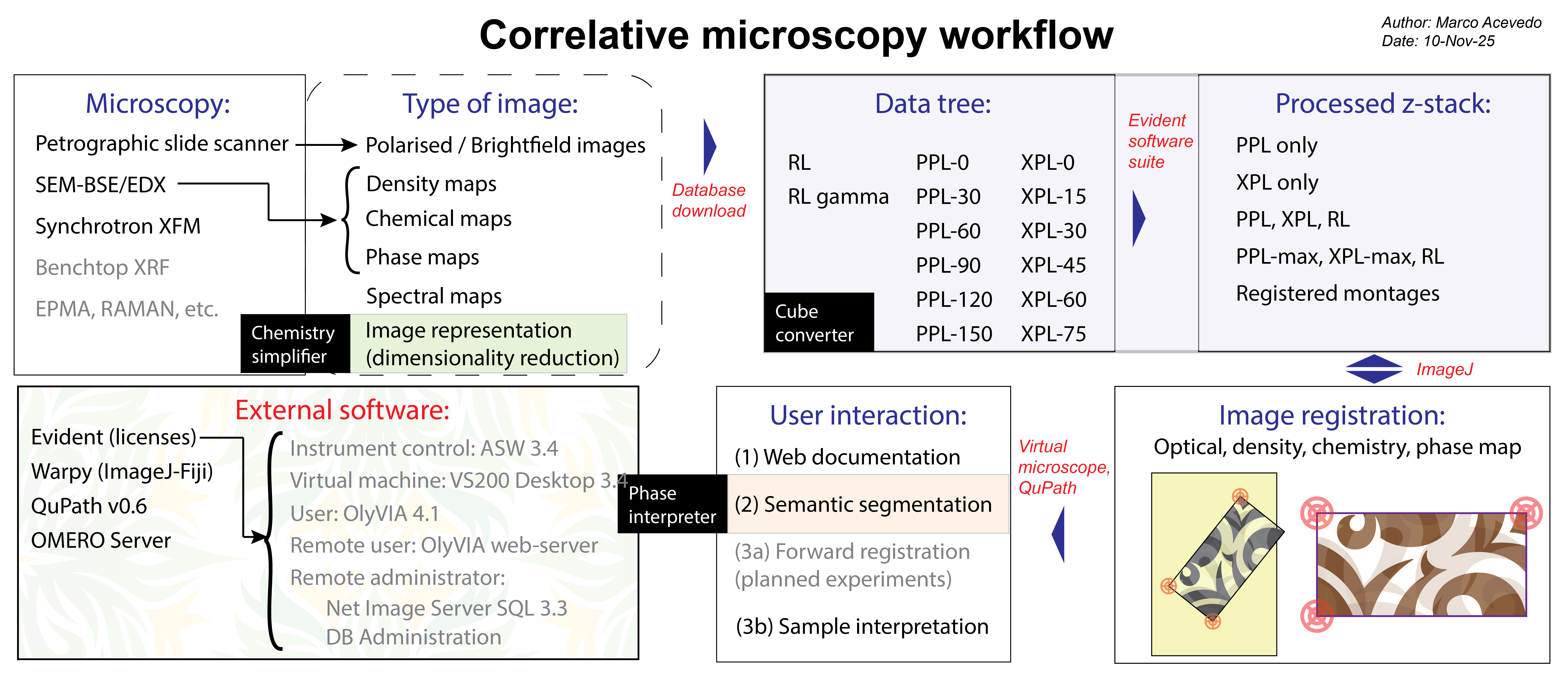
With this software you can add new dimensions to your analysis since polarised optical microscopy can rapidly map for:
- Mineral identification: distinctive colour (Acevedo Zamora & Kamber, 2023), isochemical phases
- Texture: grains (properties), boundaries, contacts, neighbouring relationships (Kamber et al., 2025), and rock fabric
- Fine micro-structure (e.g., diagenetic dykes), even if they are not shown in chemical maps (Acevedo Zamora et al., 2024)
- Accessory phases and micro-inclusions (at high magnification)
- Sample depth/volume (focusing as planes or extended depth of focus)
- Mineral optic-axis and/or slow-axis orientation (Acevedo Zamora et al., 2024)
- Sample preparation quality and planing the location of new micro-analytical experiments, e.g., XPL colours depend on thickness
Get ready to make the best of your data, new discoveries and imagine new image analysis tools. Citing our work makes us more sustainable (references in GitHub).
Open-source code
The programs are provided as version 1 (beta) for testing. Users and developers are welcome to contribute. The GitHub source code is provided below:
- Cube converter repo: in Python language
- Chemistry simplifier repo: in Python
- Phase interpreter repo: in MatLab
Thank you for your attendance.
Cheers,
Marco Acevedo
Workshop material (all files)
All the files required are (in the recommended order):
.
├── Slides_image analysis workshop_v1.pptx
├── VS200 slide scanner acquisition_fast motion.mp4
├── Workflow_v2-01.png
├── booklet_11-Nov-25_extra materials.docx
├── booklet_12-Nov-25_v3.docx
├── exercises data
│   ├── desktop.ini
│   ├── optical
│   │   ├── Image_03.vsi
│   │   └── _Image_03_
│   ├── registered_pyramids
│   │   ├── BSE_pyramid.tif
│   │   ├── ama_phasemap_pyramid.tif
│   │   ├── dsa_selected_artefacts_8bit_pyramid.tif
│   │   ├── montages_original
│   │   │   ├── 10x_RL BF_01_z0.tif
│   │   │   ├── 10x_ppl-0_01_z0.tif
│   │   │   ├── 10x_ppl-120_01_z0.tif
│   │   │   ├── 10x_ppl-30_01_z0.tif
│   │   │   ├── 10x_ppl-90_01_z0.tif
│   │   │   ├── 10x_xpl-0_01_z0.tif
│   │   │   ├── 10x_xpl-30_01_z0.tif
│   │   │   ├── 10x_xpl-45_01_z0.tif
│   │   │   └── 10x_xpl-75_01_z0.tif
│   │   ├── montages_rt
│   │   │   ├── ppl_maxIndex_z0.tif
│   │   │   ├── ppl_max_z0.tif
│   │   │   ├── xpl_maxIndex_z0.tif
│   │   │   └── xpl_max_z0.tif
│   │   ├── montages_z-stack
│   │   │   ├── optical_z-stack.tif
│   │   │   ├── ppl_z-stack.tif
│   │   │   ├── reduced_z-stack.tif
│   │   │   └── xpl_z-stack.tif
│   │   ├── pca_all elements_8bit_pyramid.tif
│   │   ├── pca_selected_artefacts_8bit_pyramid.tif
│   │   └── umap_selected_artefacts_8bit_pyramid.tif
│   └── sem
│       ├── 20BSK-001B - BSE 17-31.5.png
│       ├── Element list.txt
│       ├── TIMA-metadata_20BSK-001B.png
│       ├── desktop.ini
│       ├── log.txt
│       ├── phasemap_reconstruction
│       ├── phasemap_target_RGB.tif
│       └── sem-edx
│           ├── 20BSK-001B - Ag-L.png
│           ├── 20BSK-001B - Al-K.png
│           ├── 20BSK-001B - As-K.png
│           ├── 20BSK-001B - As-L.png
│           ├── 20BSK-001B - Au-L.png
│           ├── 20BSK-001B - Au-M.png
│           ├── 20BSK-001B - Ba-L.png
│           ├── 20BSK-001B - Bi-L.png
│           ├── 20BSK-001B - Bi-M.png
│           ├── 20BSK-001B - Br-K.png
│           ├── 20BSK-001B - Br-L.png
│           ├── 20BSK-001B - C-K.png
│           ├── 20BSK-001B - Ca-K.png
│           ├── 20BSK-001B - Cd-L.png
│           ├── 20BSK-001B - Ce-L.png
│           ├── 20BSK-001B - Cl-K.png
│           ├── 20BSK-001B - Co-K.png
│           ├── 20BSK-001B - Co-L.png
│           ├── 20BSK-001B - Cr-K.png
│           ├── 20BSK-001B - Cs-L.png
│           ├── 20BSK-001B - Cu-K.png
│           ├── 20BSK-001B - Cu-L.png
│           ├── 20BSK-001B - Dy-L.png
│           ├── 20BSK-001B - Dy-M.png
│           ├── 20BSK-001B - Er-L.png
│           ├── 20BSK-001B - Er-M.png
│           ├── 20BSK-001B - Eu-L.png
│           ├── 20BSK-001B - Eu-M.png
│           ├── 20BSK-001B - F-K.png
│           ├── 20BSK-001B - Fe-K.png
│           ├── 20BSK-001B - Fe-L.png
│           ├── 20BSK-001B - Ga-K.png
│           ├── 20BSK-001B - Ga-L.png
│           ├── 20BSK-001B - Gd-L.png
│           ├── 20BSK-001B - Gd-M.png
│           ├── 20BSK-001B - Ge-K.png
│           ├── 20BSK-001B - Ge-L.png
│           ├── 20BSK-001B - Hf-L.png
│           ├── 20BSK-001B - Hf-M.png
│           ├── 20BSK-001B - Hg-L.png
│           ├── 20BSK-001B - Hg-M.png
│           ├── 20BSK-001B - Ho-L.png
│           ├── 20BSK-001B - Ho-M.png
│           ├── 20BSK-001B - I-L.png
│           ├── 20BSK-001B - In-L.png
│           ├── 20BSK-001B - Ir-L.png
│           ├── 20BSK-001B - Ir-M.png
│           ├── 20BSK-001B - K-K.png
│           ├── 20BSK-001B - La-L.png
│           ├── 20BSK-001B - Lu-L.png
│           ├── 20BSK-001B - Lu-M.png
│           ├── 20BSK-001B - Mg-K.png
│           ├── 20BSK-001B - Mn-K.png
│           ├── 20BSK-001B - Mo-K.png
│           ├── 20BSK-001B - Mo-L.png
│           ├── 20BSK-001B - N-K.png
│           ├── 20BSK-001B - Na-K.png
│           ├── 20BSK-001B - Nb-K.png
│           ├── 20BSK-001B - Nb-L.png
│           ├── 20BSK-001B - Nd-L.png
│           ├── 20BSK-001B - Nd-M.png
│           ├── 20BSK-001B - Ni-K.png
│           ├── 20BSK-001B - Ni-L.png
│           ├── 20BSK-001B - O-K.png
│           ├── 20BSK-001B - Os-L.png
│           ├── 20BSK-001B - Os-M.png
│           ├── 20BSK-001B - P-K.png
│           ├── 20BSK-001B - Pb-L.png
│           ├── 20BSK-001B - Pb-M.png
│           ├── 20BSK-001B - Pd-L.png
│           ├── 20BSK-001B - Pr-L.png
│           ├── 20BSK-001B - Pr-M.png
│           ├── 20BSK-001B - Pt-L.png
│           ├── 20BSK-001B - Pt-M.png
│           ├── 20BSK-001B - Rb-K.png
│           ├── 20BSK-001B - Rb-L.png
│           ├── 20BSK-001B - Re-L.png
│           ├── 20BSK-001B - Re-M.png
│           ├── 20BSK-001B - Rh-L.png
│           ├── 20BSK-001B - Ru-L.png
│           ├── 20BSK-001B - S-K.png
│           ├── 20BSK-001B - Sb-L.png
│           ├── 20BSK-001B - Sc-K.png
│           ├── 20BSK-001B - Se-K.png
│           ├── 20BSK-001B - Se-L.png
│           ├── 20BSK-001B - Si-K.png
│           ├── 20BSK-001B - Sm-L.png
│           ├── 20BSK-001B - Sm-M.png
│           ├── 20BSK-001B - Sn-L.png
│           ├── 20BSK-001B - Sr-K.png
│           ├── 20BSK-001B - Sr-L.png
│           ├── 20BSK-001B - Ta-L.png
│           ├── 20BSK-001B - Ta-M.png
│           ├── 20BSK-001B - Tb-L.png
│           ├── 20BSK-001B - Tb-M.png
│           ├── 20BSK-001B - Te-L.png
│           ├── 20BSK-001B - Th-L.png
│           ├── 20BSK-001B - Th-M.png
│           ├── 20BSK-001B - Ti-K.png
│           ├── 20BSK-001B - Tl-L.png
│           ├── 20BSK-001B - Tl-M.png
│           ├── 20BSK-001B - Tm-L.png
│           ├── 20BSK-001B - Tm-M.png
│           ├── 20BSK-001B - U-L.png
│           ├── 20BSK-001B - U-M.png
│           ├── 20BSK-001B - V-K.png
│           ├── 20BSK-001B - W-L.png
│           ├── 20BSK-001B - W-M.png
│           ├── 20BSK-001B - Y-K.png
│           ├── 20BSK-001B - Y-L.png
│           ├── 20BSK-001B - Yb-L.png
│           ├── 20BSK-001B - Yb-M.png
│           ├── 20BSK-001B - Zn-K.png
│           ├── 20BSK-001B - Zn-L.png
│           ├── 20BSK-001B - Zr-L.png
│           ├── 20BSK-001B - _Zr-K.png
│           ├── after_selected
│           ├── after_selected_artefacts
│           └── after_spectra
├── files
│   ├── Chemistry Simplifier v1
│   │   ├── Chemistry Simplifier v1.exe
│   │   └── _internal
│   ├── Cube Converter v1
│   │   ├── Cube Converter v1.exe
│   │   └── _internal
│   ├── Fiji.app.zip
│   ├── Phase interpreter v1
│   │   ├── MyAppInstaller_mcr.exe
│   │   ├── data
│   │   └── readme.txt
│   ├── QuPath-v0.6.0-Windows.msi
│   └── iview472_x64_setup.exe
├── ~$oklet_11-Nov-24.docx
└── ~WRL3924.tmp