Cube Converter
Cube Converter software focuses on processing whole-slide images from 2D polarised microscopy imaging in plane- (PPL) and cross-polarised (XPL) light using transmitted ray tracing as well as reflected light. The user can extract the experimental metadata and export the original maps and use them to calculate colour (via descriptive statistics) and morphological features (edges) from rock mineral grains observed in thin sections. The second part of the software can produce multi-modal image stacks for opening them in other software as z-stacks or individual images. Locally, the output intermediate/final images are saved in a structured folder sequence for each input VSI file input (original scans and ray tracing images).
The current version only supports Evident VS200 slide scanner using the acquisition routines defined by Acevedo Zamora and Kamber (2023) in Evident ASW software. Since we adopted the OME-TIFF format (BioFormats), all outputs can be read in most bio-informatics (QuPath, OMERO Server) microscopy software and the Evident software suite (up to a 20 GB limit). I acknowledge that most users will not have a VS200 slide scanner and our data acquisition routines. Currently, these are available in two laboratories in Queensland, see (CARF, Centre for Microscopy and Microanalysis). Let me know if you know of additional locations with geoscience focus or if you would like to try the technology to a different field. Under a scientific collaboration project, I could visit your laboratory and make your scanner compatible with Cube converter software.
Polarised microscopy processor
The tool can represent a set of multi-angle polarised images (plane-polarised (PPL) pleochroism and cross-polarised (XPL) birefringence) as summary “ray tracing” (descriptive statistics: max, min, std, mean, index of max/min) images. For example, XPL-max looks the same as XPL circular polarisation without having to install extra optical components in your microscope. These images are friendlier for pixel/object classification/segmentation tasks due to the homogenisation of colours regarless of “virtual” stage rotation.
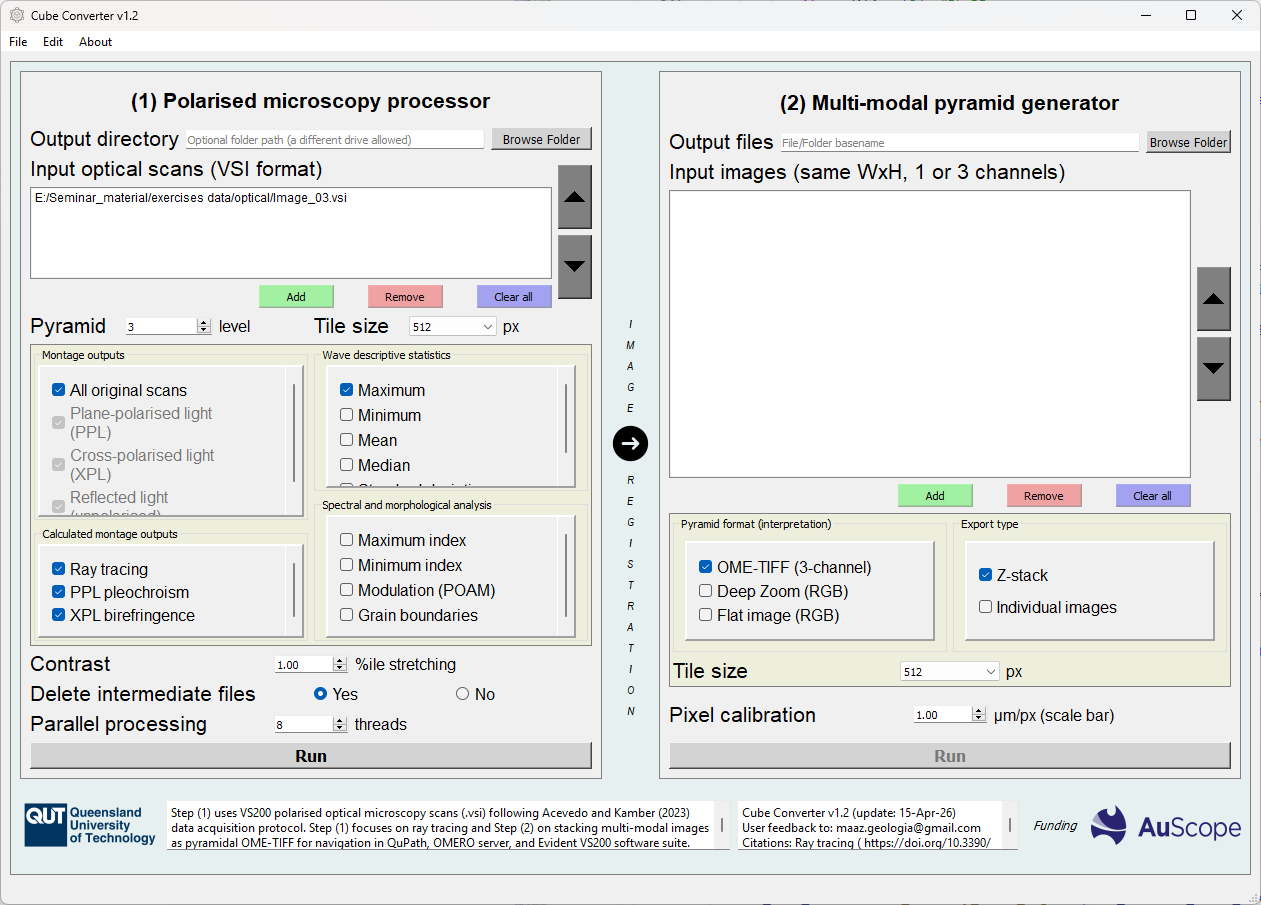
Figure 2: Cube Converter v1.2 graphical user interface using Step 1
Data management
Output directory (optional): Select the output folder clicking the Browse Folder button. If no name is provided, the default is where the last selected VSI image lived. This option allows selecting a different destination disk to reduce processing time due to data friction.
Input optical scans: List of scan VSI file paths for processing. We call them Data Trees because they contain the scans a series of layers referenced to the same metadata (header) within the file. The list is meant for overnight processing of similar data acquisition experiments.
Add, Remove, Clear all buttons: Options to customise list. The list can also be arranged in a particular order (grey up/down arrows).
Pyramid: Selected level from the pyramid representation of the image. Level 0 is the full resolution scan, level 1 is half the Width/Height (25% file size), level 2 is a quarter (6.25%), and so on. Processing will take place for longer with a smaller pyramid level.
Tile size: Pyramids are made of squared tiles (512x512 px). Smaller tiles will produce a much larger number of file input/output operations but release RAM memory resources (for preventing overload). If you PC has low RAM, use smaller tiles and wait longer. Note that your disk must be fast to support more tiles.
Optical image processing
Montage outputs: Select the original scans within the VSI file to export as OME-TIFF pyramids. If a microscopy observation mode (modality) is not available, an error will be shown when running the processing loop through the input list.
Calculated montage outputs: Whether or not you want to do Ray tracing and what modality you require from transmitted light data. PPL colours represent pleochroism and XPL represent interference colours (light wave retardation).
Wave descriptive statistics: Select outputs between maximum, minimum, mean, median, and standard deviation. They have different applications.
Spectral and morphological analysis: Select outputs between phase (‘virtual stage rotation’ maximum and minimum index), modulation (red= transmittance, green= phase, blue= retardance), and mineral grain boundaries (edges).
The modulation image corresponds to Step 2 of the Pipeline for Optic Axis Mapping (POAM) that will be deepened in future releases.
The boundaries image is intense at grain contacts but include cleavage and fracture planes, which will be isolated in future algorithm research. You can preliminary use it to improve your optical phase map by subtracting the edges mask from any phase map (e.g., SEM-EDX, mineral liberation map).
The additional options include:
Contrast: The percentage to be capped at the top and bottom of an output montage channel histogram to reduce outliers pixels.
Delete intermediate files: Extra file management option to save disk space. Cube converter uses internal checkpoints to resume interrupted work. Even if processing was successful, you can resume and add more Ray tracing work if you select No.
Parallel processing: Number of CPU core threads that are used to process pyramids tiles. The default value is half of your physical cores.
Multi-modal pyramid generator
The aim of the image pyramid generator is saving a custom image stack as very large pyramid(s) for image navigation or analysis in other software.
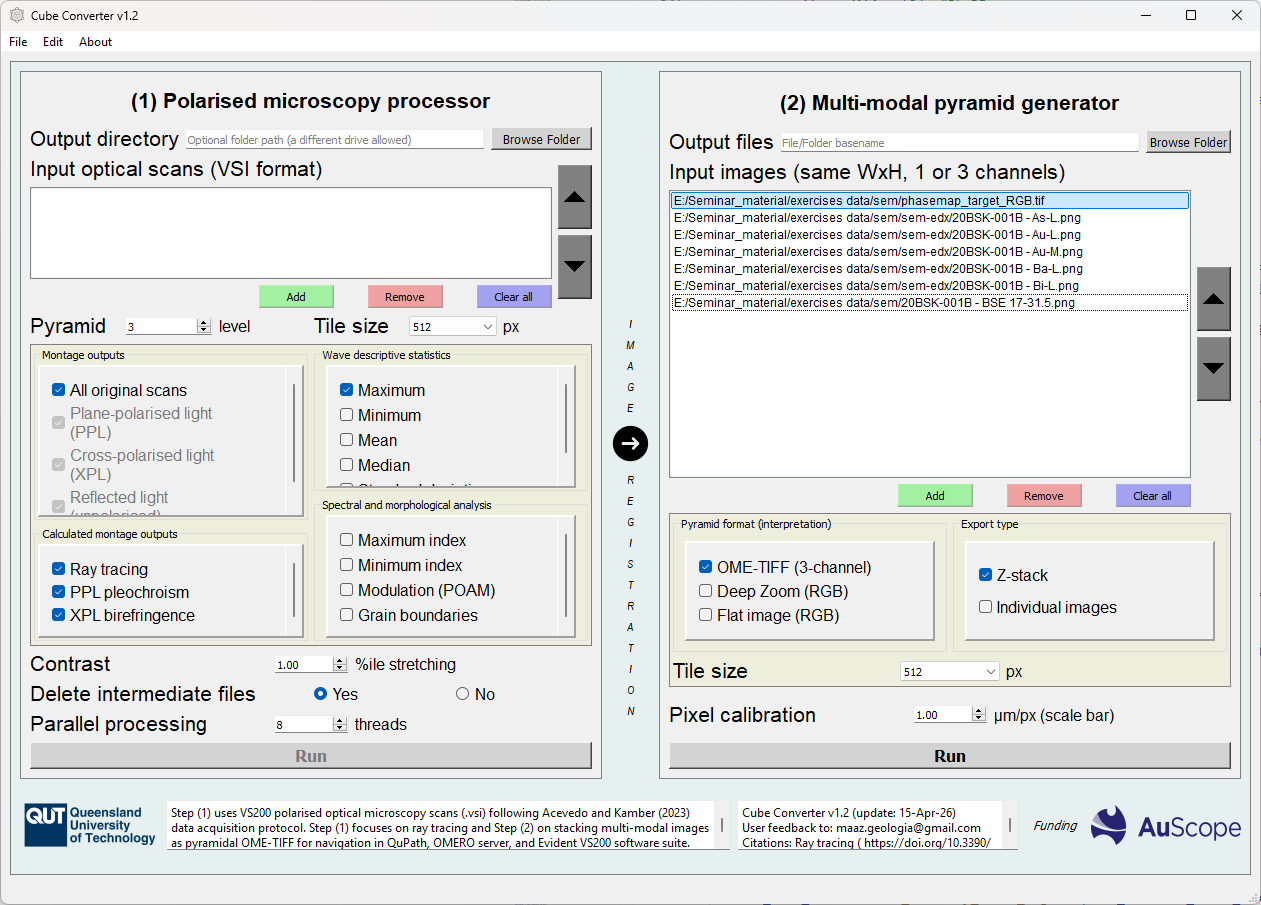
Figure 3: Cube Converter v1.2 graphical user interface using Step 2
Configure Z-stack
Output files: Select the output folder (if individual images) or file basename (if z-stack). The Browse Folder button allows selecting the destination folder. If no name is provided, the basename becomes ‘default’.
Input images: List of file paths that are going to constitute the stack. They need to be of the same size (Width x Height) and will be read as 3-channel images (convention). There is a flexibility on the input image format (flat or pyramidal).
Add, Remove, Clear all buttons: Customise options for the list arranged in a particular order (up/down arrows).
Exportation mode
This section allows configuring the output(s).
Pyramid format: The generator can be used either for producing pyramidal (OME-TIFF), Deep Zoom, or flat images.
Export type: The pyramidal images can be z-stacks or individual images, while the other two formats are only allowed for individual images. These options exist to allow maximum compatibility with other software such as virtual/spectral microscopes (far away from Bioinformatics).
The user can input the pixel calibration (microns/pixel) to have a calibrated scalebar within other software as long as they can read OME-TIFF metadata (QuPath). The value you input will overwrite any previous calibration available.
The calculation of this value depends on the fixed or reference image pixel size. For an optical scan we can calculated like this:
The equation is specific to every microscope and experiment, so keeping a manual input allows flexibility.